
Overwhelmed by Notion? Try This Simple Life Dashboard for Beginners
If you’ve ever been overwhelmed by Notion, you probably had the same reaction most people do:
“This looks amazing… but where do I even start?”
Notion is one of the most powerful productivity tools out there. You can build planners, track habits, manage finances, organize your entire life—all in one place. But that flexibility comes with a downside: it can feel overwhelming fast.
Instead of helping you get organized, it often leaves you staring at a blank page, unsure how to structure anything. Do you need databases? Linked views? A calendar? A dashboard? And once you start, how do you make everything actually work together?
Many users download Notion with the best intentions… and then never use it.
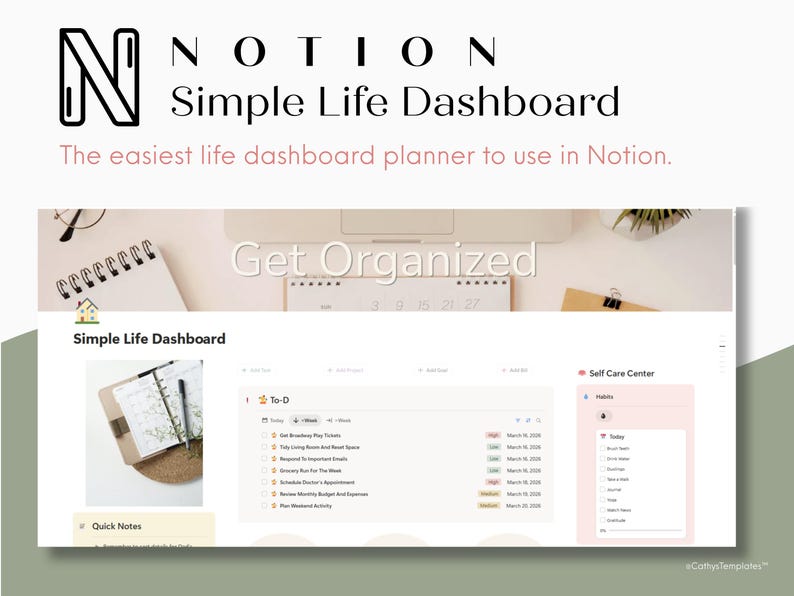
I created a Simple Life Notion Dashboard for beginners, and that’s exactly the problem this dashboard was designed to solve.
Instead of starting from scratch or trying to piece together complicated systems, this template gives you a simple, fully connected life dashboard that’s ready to use from day one. No confusion. No overthinking. Just a clean space to manage your tasks, habits, goals, and daily life—all in one place.
What Is a Notion Dashboard?
At its core, a Notion dashboard is a central hub where you organize and manage different areas of your life in one place. Instead of jumping between multiple apps for tasks, notes, calendars, and goals, everything lives inside one structured system.
According to Notion, the platform is designed to be an all-in-one workspace—meaning you can combine planning, tracking, and organization into a single, customizable setup.
A typical Notion dashboard might include:
- A to-do list for daily tasks
- A habit tracker to build routines
- A calendar for scheduling
- A place to store notes and ideas
- Goal tracking systems
The idea is simple: one page that gives you a clear overview of your life.
But here’s where things get tricky.
Because Notion is so customizable, there’s no single “right” way to build a dashboard. You can create anything—but that also means you have to decide everything:
- How to structure your pages
- What systems to use
- How everything connects
For beginners, especially, this can turn what should be a helpful tool into something confusing and time-consuming.
That’s why having a pre-built, thoughtfully designed dashboard makes such a big difference—it removes the guesswork and lets you focus on actually using the system instead of building it.
Why Notion Feels Hard to Use
Notion isn’t difficult because it’s poorly designed—it’s difficult because it gives you too much freedom without enough structure.
When you open a blank page, you’re not just writing a to-do list. You’re being asked to build a system:
- Should this be a simple list or a database?
- Do you need tags, priorities, or due dates?
- How will this connect to your calendar, goals, or habits?
Most people don’t have answers to those questions upfront. So instead of getting organized, they get stuck. Another challenge is how Notion’s core features work together. The real power of Notion comes from things like:
- Databases
- Linked views
- Filters and relations
But those aren’t intuitive at first. You might create a task list, then realize later you want it connected to a calendar or a goal tracker—and suddenly you’re rebuilding everything from scratch. There’s also the issue of overbuilding. Many templates look impressive, but they include:
- Too many sections
- Unnecessary tracking systems
- Layouts that look good but aren’t practical
That creates friction. And when something feels like work to maintain, people stop using it. The result is a pattern a lot of users fall into: Download Notion > try to set everything up > get overwhelmed > abandon it.
The problem isn’t motivation—it’s the lack of a clear, usable structure from the start.
The Solution: A Simple Life Dashboard for Beginners
The easiest way to not be overwhelmed by Notion and make it work isn’t to learn every feature—it’s to start with a system that already makes sense.
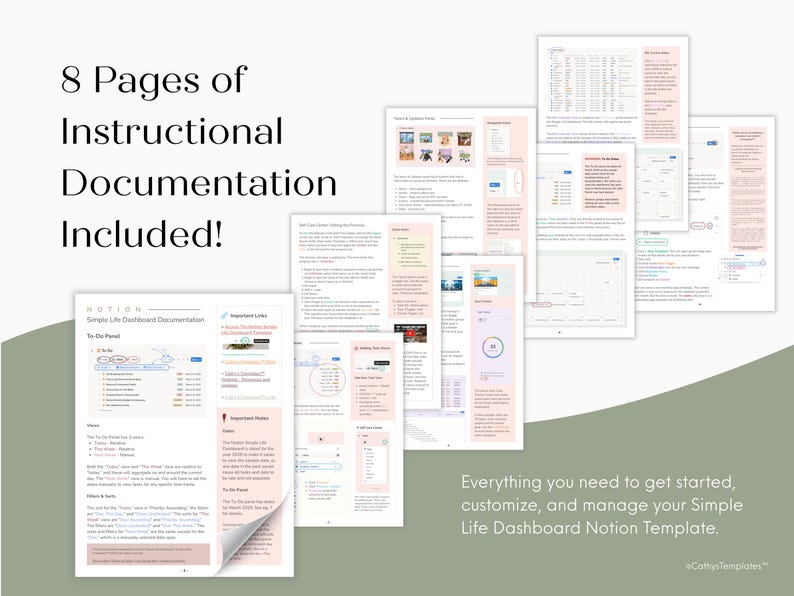
This dashboard was designed to remove the biggest friction points and replace them with something practical and easy to maintain. Instead of building from scratch, everything is already structured so you can focus on using it right away. And it comes with 8 pages of instructional documentation with everything you need to get started, customize, and maintain your Simple Life Notion Dashboard for beginners.
At its core, the system is built around how people actually manage their lives:
- Daily Tasks That Are Clear And Actionable
- Habits That Support Long-Term Consistency
- Goals Broken Down Into Manageable Steps
- Bills And Calendar Events That Stay Organized In One Place
Everything is connected, but not complicated. You’re not dealing with unnecessary layers or overly complex setups—just a clean system where each section serves a purpose.
Another key difference is that this dashboard avoids the “perfect productivity” trap. It’s not designed to track everything. It’s designed to track what actually matters. That makes it easier to stick with over time.
Key Features Breakdown
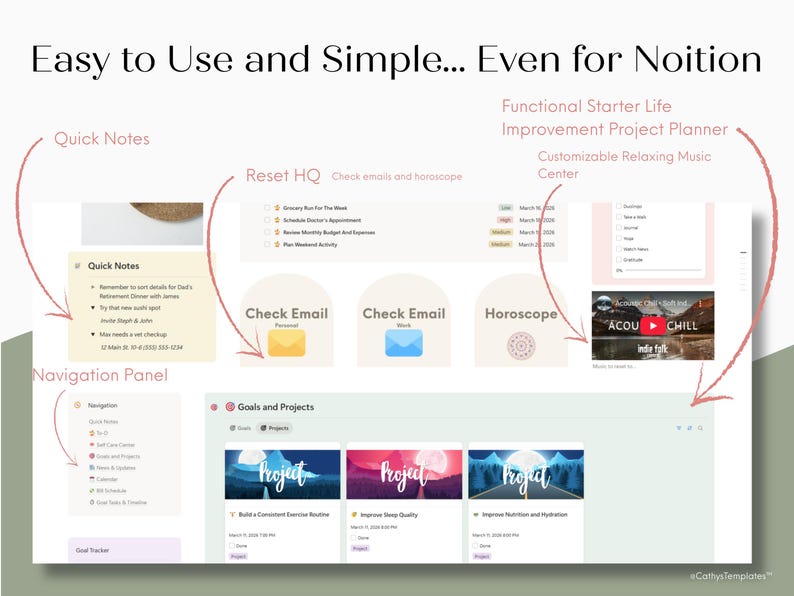
This dashboard combines all the elements you need to organize your life without overwhelming you. Each feature is designed to work together seamlessly, making it simple to track tasks, habits, and goals while staying aware of important updates.
Daily Task Management
- Organize tasks into Today, This Week, and Next Week views
- Prioritize important tasks without clutter
- See what’s due at a glance and adjust as needed
Habit Tracking
- Track daily habits to build consistency
- Visual progress makes it easier to stay motivated
- Integrates with your daily tasks for a complete picture
- Noted to help with overall wellbeing
Goals & Projects System
- Break big goals into actionable projects and task
- Timeline view shows how tasks connect to larger goals
- Includes a working example: Improve Health & Energy in 6 Months
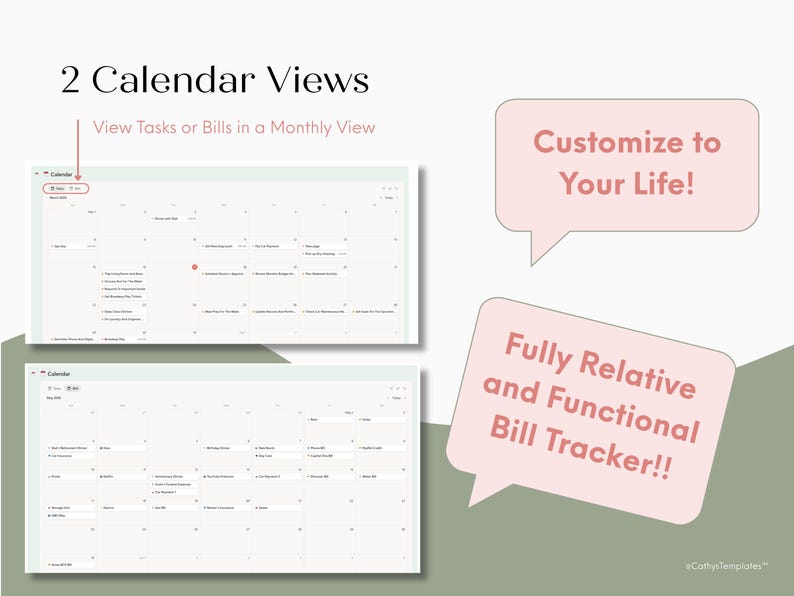
Calendar & Bills Integration
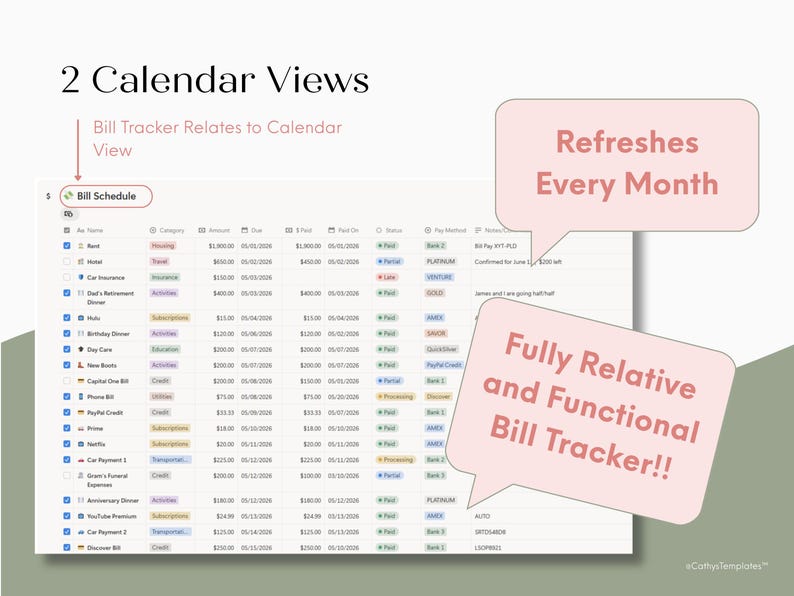
- Calendar view automatically shows tasks and due dates
- Separate bills calendar links to the bill tracker
- Reduces the chance of missing deadlines or forgetting payments
- A calendar view for the bills tracker
News & Weekly Reset Section
- Quickly check news, grocery deals, local events, and stock updates
- Designed to support a Sunday planning ritual
- Keeps all important weekly updates in one place
Quick Access & Lifestyle Features
- Buttons for personal and work email and horoscope
- Embedded acoustic chill playlist for relaxing while planning
- Quick notes section captures ideas and reminders
A Real Example: A 6-Month Life Goal
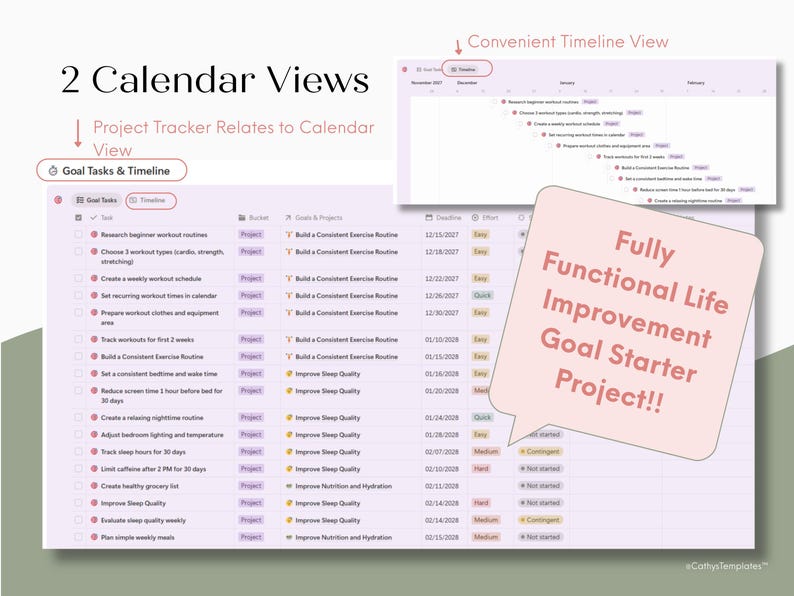
One of the biggest challenges with Notion templates is that most of them show structure but not how to actually use it. That’s why this Notion dashboard includes a fully worked example goal: Improve Health & Energy in 6 Months.
This goal demonstrates how a large, abstract objective can be broken down into projects and actionable tasks that fit into your daily and weekly routine.
Here’s how it works:
Goal: Improve Health & Energy in 6 Months
All project tasks fit into the larger goal of improving health and nutrition in 6 months.
Project 1: Build a consistent exercise routine
- Research beginner workouts
- Create a weekly schedule
- Set recurring times in the calendar
Project 2: Improve sleep quality
- Set consistent bedtime and wake time
- Reduce screen time before bed
- Track sleep for two weeks
Project 3: Improve nutrition and hydration
- Plan weekly meals
- Prep healthy meals in advance
- Track water intake
This approach is backed by research: The American Psychological Association notes that small, consistent lifestyle changes are the most effective way to improve overall health. By turning a broad goal into practical steps, this dashboard shows exactly how to make progress without feeling overwhelmed.
With the timeline view, you can see how each task contributes to the goal over the quarter, making it easy to stay accountable and measure progress visually.
How This Dashboard Fits Into Your Weekly Routine
One of the strengths of this dashboard is that it’s designed to work with your natural rhythm, rather than forcing you into a rigid system. By integrating tasks, habits, and goals with a simple weekly flow, it helps you stay organized while reducing decision fatigue.
Here’s a realistic use case:
- Morning: Check your tasks for the day, glance at the habit tracker, and review any pressing emails.
- Midday: Update completed tasks and mark habits as done. Use the acoustic chill playlist to stay focused while working or studying.
- Evening: Add quick notes for ideas, plan for tomorrow, and do a brief review of what you accomplished.
- Sunday: Conduct a weekly reset—check bills, review upcoming events, update your goals timeline, and scan the news & updates panel for what’s relevant in the week ahead.
This system makes it easy to stay on top of multiple areas of life without switching apps or pages. By having everything in one dashboard, you spend less time organizing and more time actually accomplishing what matters.
For productivity and habit-building, research from the American Psychological Association shows that consistent, small daily actions tied to a routine dramatically increase long-term success, which is exactly what this dashboard supports.
Who This Template Is For
This dashboard is designed for anyone who wants a clear, structured, and practical way to organize their life without spending hours learning and still being overwhelmed by Notion.
It’s especially helpful for:
- Beginners to Notion – If you’ve downloaded and been overwhelmed by Notion, this template gives you a ready-to-use system.
- Busy People – Keep track of tasks, bills, goals, and habits without juggling multiple apps or planners.
- Goal-Oriented Users – The pre-built example shows how to break a broad goal into actionable projects and tasks.
- Anyone Looking to Improve Wellness and Productivity – Integrates lifestyle, work, and self-care elements in one central hub.
Providing both structure and flexibility allows this dashboard to work for a wide range of users, from students and professionals to stay-at-home parents or anyone looking to simplify their routines.
Final Thoughts
Notion is a powerful tool, but its flexibility can also make it intimidating. This Simple Life Dashboard for beginners solves that problem by giving you a ready-to-use, fully structured system that combines tasks, habits, goals, bills, and weekly planning in one place.
With this dashboard, you can:
- Track daily tasks and habits without feeling overwhelmed
- Plan and achieve meaningful goals with a clear roadmap
- Stay on top of bills, news, and updates effortlessly
- Build a weekly routine that supports productivity and wellbeing
If you’ve struggled to make Notion work for you—or if you’ve downloaded templates that felt complicated or incomplete—this dashboard is designed to get you started immediately. Use the included habits in the habit tracker, create your own, or use this habit list by Harvard University.
Start organizing your life in minutes, build habits that stick, and take control of your productivity and wellness with a system that’s simple, practical, and effective.

0 comments